Make decisions together
Bring ship data and comparisons to the place where you’re already planning and talking.
Which ship suits our plans? How is my profile developing? Where are our clan’s strengths? Friendly Helpers brings answers to your Discord chat. Compact results start the conversation, and useful web links lead to the details.
This guide is in English. The bot, Control Panel and original screenshots currently use German. Commands and button names below match the interface.
Bring ship data and comparisons to the place where you’re already planning and talking.
Profiles, statistics, ranked results and records offer different views of your game.
Demo mode regularly showcases selected real bot commands without someone having to run them manually.
Look up a ship, compare players or plan the next match together. Your conversation stays in one place.
/info/profil/vergleich/clanduellFind technical ship data, search by nation and class, compare two ships or ask for a random suggestion.
Explore battle statistics, ship statistics and records by battle mode, including overall Ranked. Rank progression, achievements and expert badges complete the picture.
Member overviews, clan comparisons, ranks, records and rankings help put strengths and activity in context together.
Look up a map or commander. Longer overview lists can be delivered to you by direct message.
Choose the demonstrations and player and clan sources you want. Every 2, 4, 6, 12 or 24 hours, the bot showcases a selection without pings. All selected commands appear once before the next shuffle.
Public help shows commands and setup entry points. If you message the bot privately, it provides an introduction with command help and developer contact.
A few deliberate steps take you from an idea to a feature your members can use.
Open the slash commands on your server. Available suggestions help you select ships, players and clans.
/info/profil/clanduellUse the relevant web links in the bot response to open detailed statistics and comparisons.
In demo mode, choose the target channel, interval and commands. Choose player and clan sources separately from linked server clans or suitable public web data.
/demomodus einrichtenUse the test action to send one demonstration to the configured target channel. Only a successful test there enables activation. Changing channels requires another test.
Run WoWS tools, comparisons and help with slash commands. The homepage command overview contains the full catalogue.
Manage command selection, sources, channel, interval and activation in the Discord centre or Control Panel.
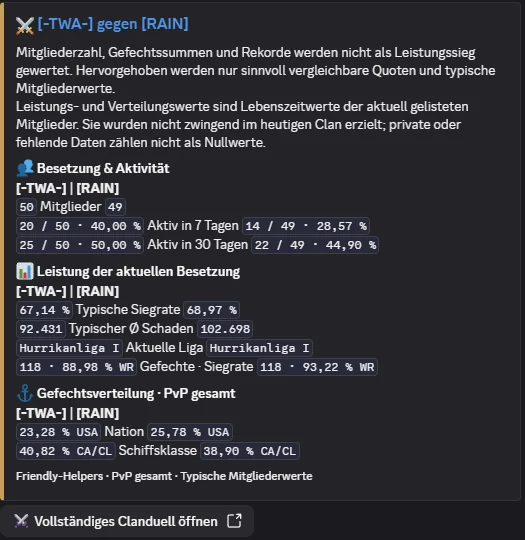
Original screenshots will show the actual German interface.
/infoShip data for the current discussion.
/vergleichCompare two ships side by side.
/profilOpen a compact player profile with links to explore further.
/rekordeExplore personal player records.
/clanduellCompare two clans by activity and typical member statistics.
/karteView a WoWS map.
/kommandantLook up a commander.
/demomodus einrichtenPrepare automatic demonstrations of selected commands.
/helpOpen public command help.
/aboutmeLearn about the bot and its features.
/zufallsschiff, /info, /vergleich, /profil, /ranked, /expert player, /schiffstats, /schiffduell, /clanmitglieder, /clanduell, /clanrang, /clanrekorde, /spieler-rankings, /karte, /kommandant and /rekorde.
The private reply provides orientation: it explains the bot and offers command help and developer contact. It does not hold an open-ended conversation or forward your message.
Relevant analysis commands offer PvP and Co-op with solo and division variants, Operations and overall Ranked. Ship views and public player rankings also include Clan Battles. PvP is the default. The /ranked command still shows rank and league; ranked quizzes are scored quiz sessions.
Depending on the player, game mode and available data, information may be missing or private profiles may be unavailable. Output indicates these limits instead of treating missing data as a real zero.
Want to get to know Friendly Helpers before adding the bot to your server? Join our Discord server. See real bot responses, try the commands available there and talk to us about ideas for your community.
Explore the bot in our public bot areas. Use /help to find useful commands and get to know the WoWS tools for yourself.
Ask us which features fit your community, from a first welcome to a quiz that brings several clans together.
Need help getting started or want to share feedback? Our server is a place for questions, experiences and ideas for improvements.
What you can try depends on the public channels and your server permissions. Admin centres and the Control Panel remain for server administrators; during its limited introduction, we arrange Operations Center demonstrations individually.