Friendly-Helpers Discord-Bot

Bot commands

A ship question in the middle of a conversation? Curious about a player or your next clan opponent? Friendly Helper brings the answer straight to Discord. Find the command that fits what you want to do.

Friendly Helper bot logo

The explanations are in English. Commands and option names match the bot’s German interface, so you can use the examples directly in Discord.

Friendly Helper · 34 user commands

What would you like to discover?

Choose a topic and find out what each command can do for you. All commands here are intended for regular members; the server decides where the bot can be used.

Type / in a channel where Friendly Helper is available, choose the command and fill in the options Discord offers. The examples below show what you can enter. Need a place to try? Join our server and give it a go.

Replace values in <angle brackets> with your selection. Options in [square brackets] are optional. Examples do not name real players; use your own public WoWS nickname.

01 → Discord

Get started

One question, a few options and an answer you can share with your community.

  1. Find your topic

    Choose a topic below and find the command that answers your question. Start with a ship, a player or something you want to explore with your clan.

  2. Enter the command in Discord

    Type the slash command and fill in its options. Use Discord’s suggested matches when they appear; the examples help you get started.

  3. Explore the result together

    Read the response, compare the results and keep the conversation going. If the command offers a web link, follow it for the corresponding view on our website.

Ships & technical details

From a quick look at a ship to a direct comparison: bring useful information into the conversation without leaving Discord.

/info

Get to know a ship through its image, role and technical details.

How fast is the ship, what can its guns do, and how well does it stay concealed? The bot brings together available details on armament, handling, concealment and consumables. Open the linked title for the full ship page.

Command options/info name:<ship>
Example input/info name:Yamato

Select the ship from Discord's suggestions.
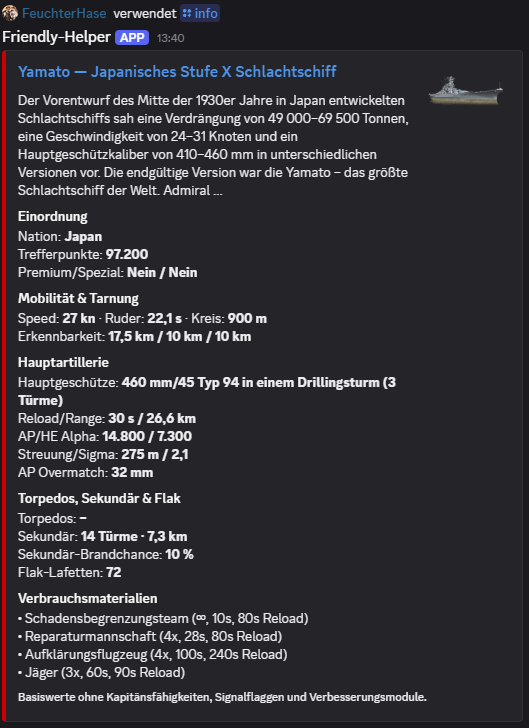
Discord output from /info

/liste

Find ships by nation or class.

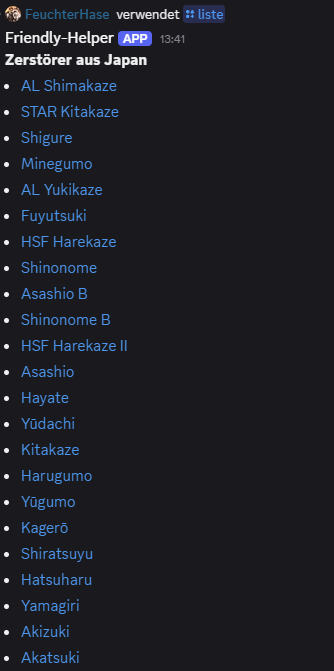
Looking for Japanese destroyers, or browsing a whole ship class? Combine nation and class, or leave both filters empty. Each ship in the list links directly to its page on our website.

Command options/liste [nation:<nation>] [klasse:<class>]
Example input/liste nation:Japan klasse:Zerstörer
Discord output from /liste

/vergleich

Compare two ships side by side.

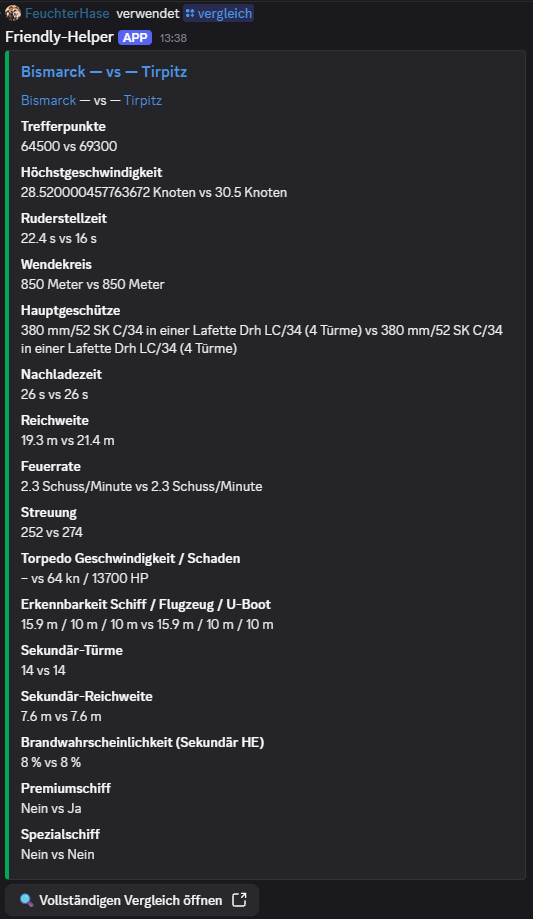
Choosing your next ship or discussing a build with the clan? Compare hit points, armament, speed and concealment in one overview to see the differences more clearly.

Command options/vergleich s1:<ship 1> s2:<ship 2>
Example input/vergleich s1:Bismarck s2:Tirpitz

The comparison uses ship base values without a selectable module build.

Discord output from /vergleich

/zufallsschiff

Discover a random ship and get the conversation going.

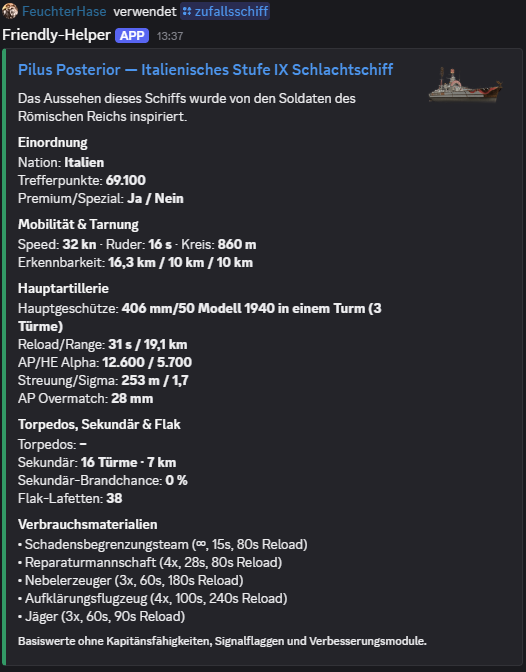
The bot picks a ship from its available catalogue and opens the familiar detail view with an image and technical information. A simple conversation starter for a themed evening or your next ship choice.

Example input/zufallsschiff

The selection is independent of the ships in your own port.

Discord output from /zufallsschiff

/patchradar

Open the latest published Patch Radar comparison.

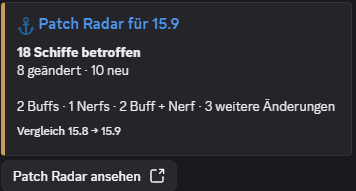
Which ships changed with the WoWS update? Bring the published overview into your channel, then follow the link to the detailed changes on our website.

Example input/patchradar

The command can show a comparison once it has been published.

Discord output from /patchradar

Players, performance & collection

Explore your performance, revisit personal bests and find the ships you have already played.

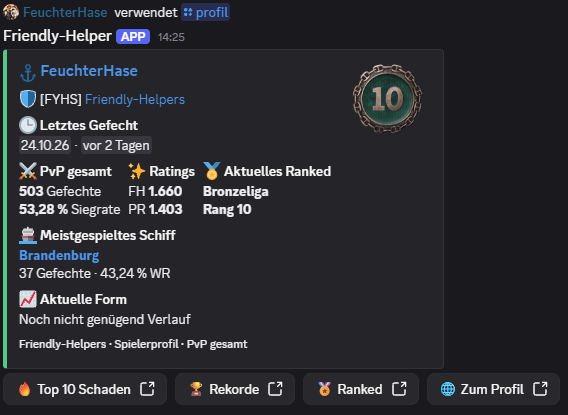
/profil

A compact player profile with direct links to the full analysis.

Battles, win rate, FH rating, PR, Ranked rank and the most-played PvP ship give you a quick first impression. Buttons take you straight to top damage, records, Ranked and the full web profile.

Command options/profil spieler:<player name>
Example input/profil spieler:<player name>

Recent form is shown only when enough recorded history is available.

Discord output from /profil

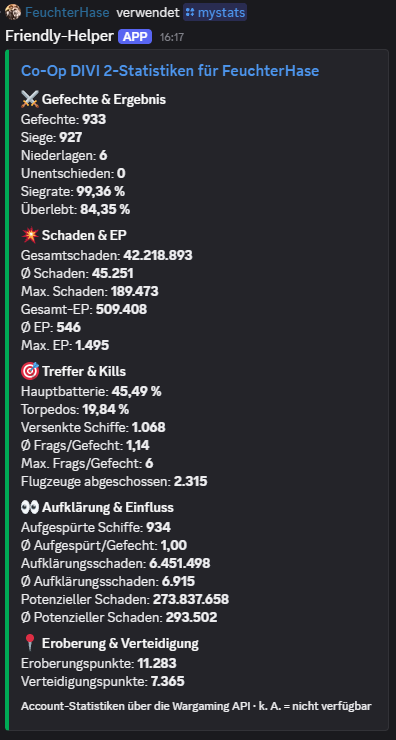
/mystats

View player statistics for your chosen battle mode.

Choose PvP, solo, two- or three-player divisions, Co-op, Operations or overall Ranked statistics. The bot groups the available values into battles, results and performance – handy after playing together.

Command options/mystats [name:<player name>] [modus:<mode>]
Example input/mystats name:<player name> modus:pvp

Choose from ten modes; PvP is the default. Ranked shows the available statistics across seasons. Missing data and temporary request problems receive a clear explanation.

Discord output from /mystats

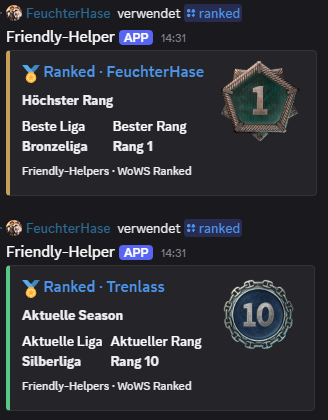
/ranked

Show the current or highest known Ranked rank.

How far has a player progressed in Ranked Battles? Choose their current standing or highest known rank. The result shows the corresponding rank and league where available.

Command options/ranked name:<player name> auswahl:<Aktuell / Höchster Rang>
Example input/ranked name:<player name> auswahl:Aktuell

This command shows rank and league. For Ranked battle statistics across seasons, select Ranked in /mystats or the relevant analysis commands.

Discord output from /ranked

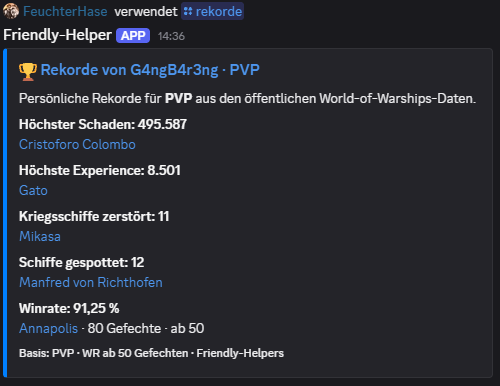
/rekorde

Discover personal bests and the ships behind them.

Which ships delivered those standout performances? Choose PvP, Co-op, Operations or overall Ranked statistics and discover the records available for that mode. Links open the matching detailed web analysis.

Command options/rekorde name:<player name> [modus:<mode>]
Example input/rekorde name:<player name> modus:pvp

Highest ship win rate requires at least 50 battles. Operations offer a smaller selection based on the data WG provides.

Discord output from /rekorde

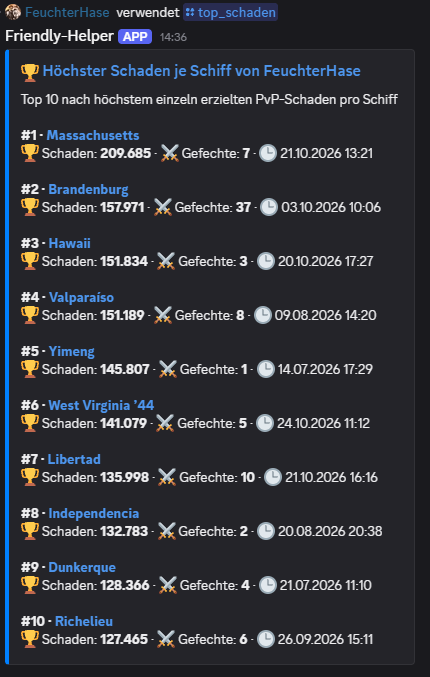
/top_schaden

The ten ships with the highest personal damage records in your chosen mode.

This is about each ship's best individual battle. Choose PvP, Co-op or Ranked and explore the matching damage peaks. Web links keep your selected mode.

Command options/top_schaden name:<player name> [modus:<mode>]
Example input/top_schaden name:<player name>

Operations do not provide damage records. The bot explains this directly rather than showing an empty or misleading top list.

Discord output from /top_schaden

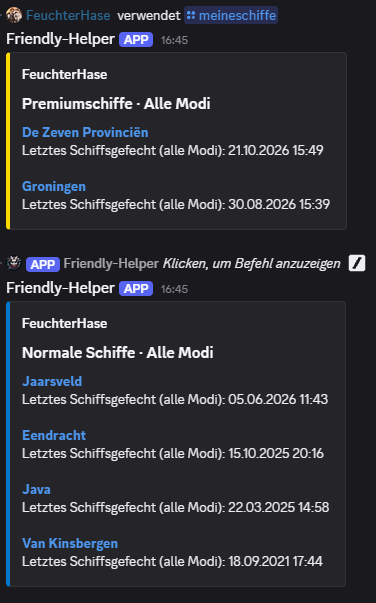
/meineschiffe

Browse ships a player has played by nation, tier and class.

Select a player from the suggestions and a nation. With no further options, you see ships they have played across all modes, separated into regular, premium and special ships. Tier, class and mode are optional filters: choose Co-op, Operations or Ranked to narrow the list.

Command options/meineschiffe spielername:<player name> nation:<nation> [tier:<tier>] [klasse:<class>] [modus:<mode>]
Example input/meineschiffe spielername:<player name> nation:Deutschland tier:8

Choose from eleven ship modes, including Clan Battles. The list shows ships played rather than current port ownership; timestamps are shown only when supported by the data.

Discord output from /meineschiffe

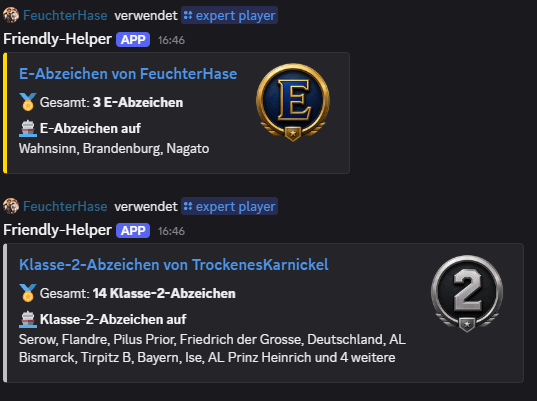
/expert player

View a player's E, class 1, class 2 and class 3 ship badges.

Choose a badge class to see the total earned and a selection of the ships associated with it. A direct profile link lets you continue exploring the collection.

Command options/expert player klasse:<E, 1, 2 or 3> player:<player name>
Example input/expert player klasse:E player:<player name>
Discord output from /expert player

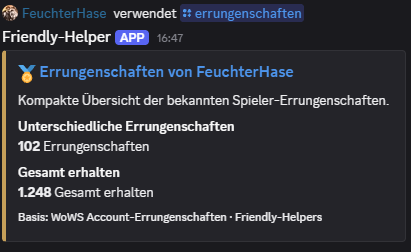
/errungenschaften

Get a compact summary of a player's achievements.

How many different achievements has a player earned, and how often in total? The concise Discord overview answers both questions and links to the full collection in their player profile.

Command options/errungenschaften name:<player name>
Example input/errungenschaften name:<player name>
Discord output from /errungenschaften

Comparisons & hit rates

The same ship, two players – or a closer look at your own performance: these commands give your next discussion a shared starting point.

/schiffstats

See how a player performs on one specific ship.

How does this ship perform in PvP, Co-op, Operations, Clan Battles or Ranked? Choose the mode directly in Discord. Battles, win rate and available performance values give a quick overview; the button opens the web analysis in the same mode.

Command options/schiffstats name:<player name> schiff:<ship> [modus:<mode>]
Example input/schiffstats name:<player name> schiff:Yamato

Available statistics vary by mode. Missing values remain clearly marked as unavailable.

/schiffduell

Compare two players on the same ship.

Compare two players on the same ship in the same battle mode. Alongside PvP and Co-op, choose Operations, Clan Battles or Ranked. The detailed web view keeps your selection.

Command options/schiffduell spieler1:<player 1> spieler2:<player 2> schiff:<ship> [modus:<mode>]
Example input/schiffduell spieler1:<player 1> spieler2:<player 2> schiff:Yamato

/spielerduell

Compare two players in the same battle mode.

Choose PvP, a division size, Co-op, Operations or overall Ranked statistics. Both players are compared in the same mode, keeping solo, division and Ranked results separate. Follow the link for the matching full web analysis.

Command options/spielerduell spieler1:<player 1> spieler2:<player 2> modus:<mode>
Example input/spielerduell spieler1:<player 1> spieler2:<player 2> modus:pvp

The mode is required. Operations compare only the values supplied by WG.

/hits liste

Privately review hit rates and performance across several ships.

Main battery and torpedo hit rates, damage, spotting and the last battle help you review your play. Filter by nation or class, then sort by battles, average damage, last battle or ship name.

Command options/hits liste player:<player name> [nation:<nation>] [klasse:<class>] [anzahl:<1–20>] [sortierung:<choice>]
Example input/hits liste player:<player name> anzahl:5

Visible only to you. Ten ships by default, up to twenty ships with PvP battles.

Clans & community

Who is in the clan, where do we stand, and what have our members achieved? Bring clan activity and shared successes into your channel.

/clanmitglieder

See members, clan roles and their last known battle.

The list separates clan leadership from other members and links players and the clan to their web pages. Useful when getting to know a clan or checking its current roster.

Command options/clanmitglieder clan:<clan>
Example input/clanmitglieder clan:<clan tag>

/clanduell

Compare two clans through activity and typical member performance.

How active are the rosters over seven and thirty days? Typical win rate, damage and available Clan Battle information add context. Different clan sizes do not turn a larger battle total into a supposed performance win.

Command options/clanduell clan1:<clan 1> clan2:<clan 2>
Example input/clanduell clan1:<clan 1> clan2:<clan 2>

Performance reflects current members' lifetime PvP statistics, not just their time in the current clan.

/leaderboard

A top ten of clan members by mode and your chosen statistic.

Win rate, average damage, battles or XP: choose the mode and statistic that matter to your comparison, including overall Ranked. The minimum battle count applies to the selected mode and helps narrow the leaderboard to a useful basis.

Command options/leaderboard clan:<clan> [sortierung:<statistic>] [min_gefechte:<number>] [modus:<mode>]
Example input/leaderboard clan:<clan tag> min_gefechte:100

If a mode does not provide the chosen statistic, the bot explains why. Private profiles are excluded.

/clanrang

See a player's standing within a clan.

Where does a member stand within the clan? Choose a battle mode, including overall Ranked, and view their available positions across different statistics. The minimum battle count applies to the selected mode.

Command options/clanrang clan:<clan> spieler:<player name> [min_gefechte:<number>] [modus:<mode>]
Example input/clanrang clan:<clan tag> spieler:<player name>

By default, members need at least 100 PvP battles to qualify.

/clanrekorde

Discover personal bests from the current clan roster in your chosen mode.

Who in the current clan roster holds the available personal bests? Choose PvP, Co-op or overall Ranked and discover the players and ships behind them.

Command options/clanrekorde name:<clan> [modus:<mode>]
Example input/clanrekorde name:<clan tag>

Operations do not provide the required record statistics. The bot gives a clear explanation for this selection.

Rankings & web lists

Get the leading places in Discord and the full list one click away. These commands connect the community with our web analyses.

/clanwars

Bring the top five from our Clan Wars list into your channel.

The bot shows the leading clans from our web analysis. Open the linked full leaderboard to follow the competition in more detail.

Example input/clanwars

/spieler-rankings

View the top five in the public player rankings.

Choose the mode, statistic and sort direction directly in Discord, including overall Ranked and Clan Battles. The top five give a quick preview; the web link keeps your selection for the full leaderboard.

Command options/spieler-rankings [modus:<mode>] [sortierung:<Kennzahl>] [richtung:<Richtung>]
Example input/spieler-rankings

Ranked leaderboards use the players whose data has been fully recorded. Missing data and statistics unavailable for a mode are explained.

/clan-rankings

View the top five in the public clan rankings.

This overview compares different clans, while the clan leaderboard compares members within one clan. Open the full web list for more context. This command uses our existing clan index and has no battle mode selector.

Example input/clan-rankings

/schiffs-meta

Show the top five in our ship statistics with useful filters.

Which ships lead in our known dataset? Narrow the results by tier, nation and class, then sort by FH rating, win rate or average damage. Follow the link for the full ship overview.

Command options/schiffs-meta [tier:<tier>] [nation:<nation>] [klasse:<class>] [min_battles:<number>] [sort:<statistic>]
Example input/schiffs-meta tier:10 min_battles:500 sort:fh

Default: at least 500 battles, sorted by FH rating. Results describe our known PvP dataset, not every WoWS player.

Maps & commanders

Look up a map, discover a commander or browse a whole nation's commanders at your own pace – straight from Discord.

/karte

Look up a particular map with its image and description.

Select a map name from the suggestions. The bot shows its available description and map image – useful when a map comes up in conversation.

Command options/karte name:<map>
Example input/karte name:<map from suggestions>

/karten

Receive the available map catalogue by direct message.

Want to explore more than one map? The bot sends map images and descriptions to you privately, leaving the server channel clear while you browse.

Example input/karten

Allow direct messages from server members to receive the list.

/kommandant

Look up a commander with their portrait and available details.

The compact view includes nationality, recruitment and retraining details. The commander's name links to the full detail page on our website.

Command options/kommandant name:<commander>
Example input/kommandant name:<commander from suggestions>

/kommandanten

Browse a nation's commanders in direct messages.

Choose a nation from Discord's list to receive the available commanders, portraits and training details without filling the public channel with individual results.

Command options/kommandanten nation:<nation>
Example input/kommandanten nation:Deutschland

The list arrives by direct message. DMs from server members must be allowed.

Quiz, help & our bot

Enjoy the quiz together, revisit results and find help: these commands are for members and do not require server administration permissions.

/quiz rangliste

View a quiz module's server-wide top ten.

Choose General Knowledge, World of Warships or Clan Quiz to see who earned points in deliberately started Ranked rounds. In larger communities, the shared leaderboard connects participants beyond a single round.

Command options/quiz rangliste modul:<Allgemeinwissen / World of Warships / Clan-Quiz>
Example input/quiz rangliste modul:Clan-Quiz

For the current Discord server. Free quiz questions do not award leaderboard points.

/quiz verlauf

Revisit saved Ranked rounds and their results.

Who won the last round, and how did the event go? Open the server's recent saved Ranked rounds and select one to see its result.

Example input/quiz verlauf

Shows the current server's history; saved Ranked rounds must be available.

/help

Find the main commands directly in Discord.

Personal help brings the main areas together and links to the command overview. A useful starting point for new members and a quick reference whenever you need it.

Example input/help

The help response is visible only to you.

/aboutme

Learn more about Friendly Helper and the story behind our bot.

Who is behind Friendly Helper, and what is it about? This command opens the bot's introduction as a personal response in Discord.

Example input/aboutme

Player and clan lookups use WoWS EU. Available statistics depend on public data and the selected battle mode.

Ready for more?

Welcome messages, stats channels and notifications help bring your community together. Explore what else Friendly Helper can add to your server.

Explore the Bot Center
Community & help

Drop in. Try our bot.

Want to get to know Friendly Helpers before adding the bot to your server? Join our Discord server. See real bot responses, try the commands available there and talk to us about ideas for your community.

See it and try it

Explore the bot in our public bot areas. Use /help to find useful commands and get to know the WoWS tools for yourself.

Ideas for your server

Ask us which features fit your community, from a first welcome to a quiz that brings several clans together.

Get help from our community

Need help getting started or want to share feedback? Our server is a place for questions, experiences and ideas for improvements.

What you can try depends on the public channels and your server permissions. Admin centres and the Control Panel remain for server administrators; during its limited introduction, we arrange Operations Center demonstrations individually.