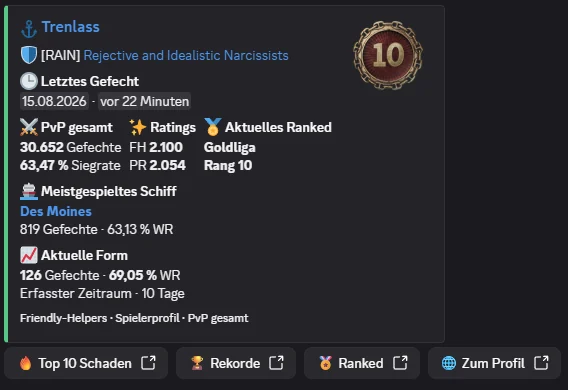
The new /profil slash command puts the key information about a World of Warships player directly in Discord. After you select a player, the bot shows a compact overview and provides targeted links to the detailed sections on Friendly Helpers.
A player profile in one response
The player name in the heading opens the full profile. If the player belongs to a clan, its tag stays clearly visible and the clan name links straight to the relevant clan page.
The response brings together:
- The last known battle, with its date and relative time
- PvP battles and win rate
- FH Rating and PR
- Current Ranked rank
- Most-played ship, with battles and win rate
- Current form based on the most recently recorded PvP battles
The most-played ship is also linked. Clicking it opens that player's personal ship analysis directly, rather than just the general ship page.
Four direct routes to the details
Four buttons below the result take you straight to the relevant sections of the player profile:
- Top 10 damage shows the ten ships with the player's highest recorded damage values.
- Records opens their personal bests.
- Ranked opens the current and previous Ranked analysis.
- Player profile opens the full player profile.
Discord remains the quick starting point, while the website holds all the available details.
Current form with a clear basis
Current form is not derived from a single snapshot or an estimated trend. Friendly Helpers compares two freshly recorded PvP snapshots and shows the battles played between them, along with their win rate. The period actually recorded is shown directly in the result.
To prevent a handful of random battles from giving a distorted impression, form is only displayed after at least ten new battles. If there is not yet a reliable basis for comparison, the bot openly says “Not enough history yet” rather than inventing a value.
The familiar Friendly Helpers look
Each invocation receives a randomly selected colour from the Friendly Helpers palette. This gives the profile some visual variety while keeping it part of the familiar bot design.
From now on, /profil is all it takes to assess a player and, if needed, jump straight to their detailed analyses.